
Fruits Factory Global は、現在準備中です。
□About the control board
〇Fruits Basket.
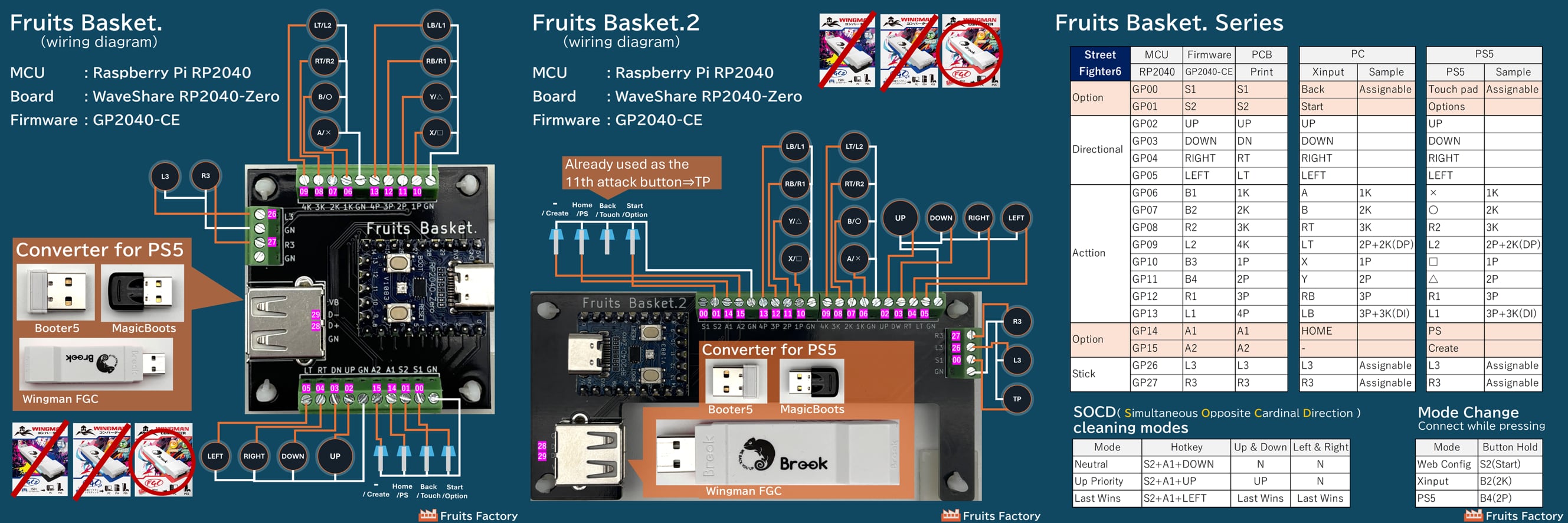
This is the RP2040 Breakout Board developed by Fruits Factory (Japan). It features the GP2040-CE as an expansion board for the RP2040-Zero. It features clear and easy wiring and a USB pass-through port for PS5 converter.
〇WaveShare RP2040-Zero
This MCU board is manufactured by Waveshare (Shenzhen, China). It features the RP2040.
〇Raspberry Pi RP2040
This is a microcontroller unit (MCU) developed by the Raspberry Pi Foundation (UK). It is best known as the Raspberry Pi Pico.
This is the Multi-Platform Gamepad Firmware for RP2040, developed by the Open Stick Community (Canada) on GitHub, an open-source project development platform. It is used in many controllers currently on the market and is considered to be highly functional and low-latency.
□About settings
〇 Introduction
Basically, you can use the controller by connecting it to your PC. While the GP2040-CE is extremely versatile, this controller is designed for a more focused purpose and uses, with a simple configuration of fighting game controls and option buttons.
〇 Mode Switching
[PC⇒2K] [PS5⇒2P] [Switch 2⇒1K]
Pressing each button while connecting will switch modes, and the settings will be saved. For PS5, press the PS switch after connecting. *A converter is required for use with PS5.
(Booter5, Magicboots, Wingman FGC, etc.)
〇Manual
Please check here for the official GP2040 manual. It's entirely in English, so we recommend translating the entire page into your country's language using your browser's functions.
You can configure the controller online. Press Start while connecting to your PC, then access http://192.168.7.1 in your web browser.
□Precautions and care
○ Areas that come into direct contact with your hands have been chamfered, but please be careful not to injure yourself on any sharp corners.
○ To clean, wipe with a soft cloth soaked in a 1% diluted solution of neutral detergent.
(Do not use solutions containing alcohol, thinner, pesodine.)